


“ASUS wants $2000 for motherboard replacement on my $3091 ROG Scar 17
- A consumer pondered on reddit.
Yeah, that is way too much. At that point, the repair bill starts sounding less like support and more like punishment.
If you have spent any time on laptop forums, you have probably seen the same pattern. People posting repair quotes that feel absurd, batteries swelling not long after coverage ends, or devices getting damaged before they even settle into daily use.
Laptops are not impulse buys for most people. They are expensive, essential, and usually expected to last years, not months.
And the repair costs do not make things any easier.
Screens can cost anywhere between $100 and $800 to replace. Keyboards and batteries often fall in the $150 to $300 range, and if the motherboard fails, the number can climb so high that replacing the laptop starts feeling like the more realistic option.
Which is exactly why it helps to know what your laptop warranty actually covers and where the gaps usually begin.
Because even when a laptop comes with warranty coverage, it does not mean every problem will be included. A lot depends on the type of issue, the kind of plan, and how the damage happened.
So before we get into the details of what’s covered, it helps to look at the broader picture.
Not every warranty covers the same kind of problem, and a lot of confusion starts there.
One plan may only cover factory defects. Another may help with accidental damage. Some only matter while the laptop is being shipped. So when people say, “It has warranty,” that still leaves a lot unanswered.
A better question to ask then is - what kind of warranty are we talking about, and what exactly does that particular plan cover?
Given below is a comparison table between different types of laptop warranties.
When you unbox a new laptop, you get a charger, a few stickers you’ll never use, and a basic promise from the brand: if something we built goes wrong, we’ll fix it.
That’s your manufacturer’s warranty.
For most laptops, it lasts one year, covering core hardware like the motherboard, RAM, SSD, display, and internal power components when the failure is due to defects in materials or workmanship. It’s there to protect you from factory errors, not accidents or daily wear.
The duration, though, depends on what you buy.
That difference comes down to how the device is expected to live.
Here’s an overview table comparing different laptop manufacturer warranties, what they cover, and where they fall short - all information is taken from the official websites.
It’s the brand saying: if we built it wrong, we’ll fix it.

Once you start using it, it won’t cover your “oh my god” moments like:
So, once the manufacturer’s warranty ends, there’s really no guarantee your laptop is safe. It can fail, overheat, or yes, even slip out of your hand on a random Tuesday. Life as you know, just happens when you least expect it.
That’s why many people choose to extend their coverage.
Purchasing an extended warranty can warrant a few unanswered questions, and honestly, that is usually where the hesitation starts.
Because let’s face it, when you’re paying extra for coverage, you expect it to actually help when something goes wrong and not just sit there sounding useful on paper.
So before you make the call, there are a few important questions worth asking first.
Your big breakdown usually starts showing with signs like a random shutdown, a charger that only works at a 45° angle, or that one pixel on your screen that’s just… always there.
And what if that happens right after your manufacturer's warranty expires? It always does. Somehow, it always does.

That’s when it helps to have your back covered with an extended warranty, something that quietly takes over when the first one ends. Because no matter how careful you are, fans get slower, SSDs age, and batteries don’t stay loyal forever.
Consumer Reports found that 16% of laptops broke or stopped working properly within three years.
And replacing the laptop is getting more expensive. Memory shortages driven in part by soaring AI data-center demand are pushing PC prices higher, with IDC now forecasting a 17% increase in average PC selling prices in 2026. Apple has already passed some of those costs on to customers, raising prices across its Mac and iPad lineup in June, with increases reaching $300 for MacBooks and $1,300 for some Mac Studio configurations.
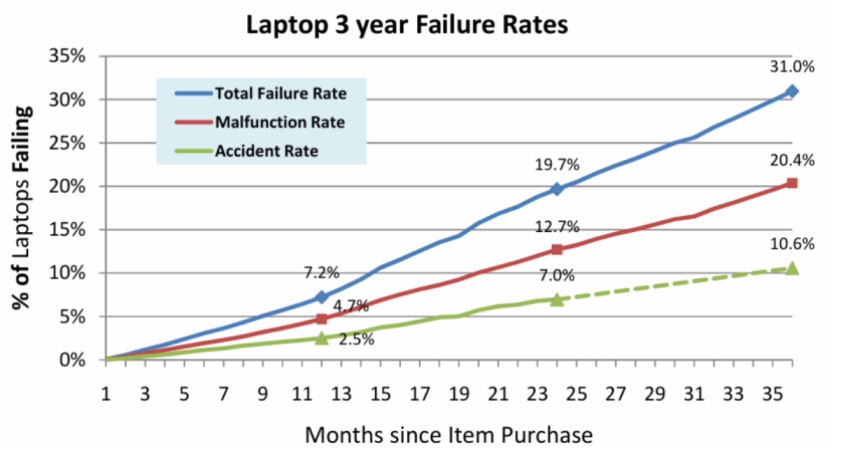
So why take a chance when you can pay a little bit now and save several hundred or even thousands of dollars later?
Here’s what most extended laptop warranties include:
So, while the manufacturer’s warranty gets you started, extended coverage makes sure the story doesn’t end with a repair bill.
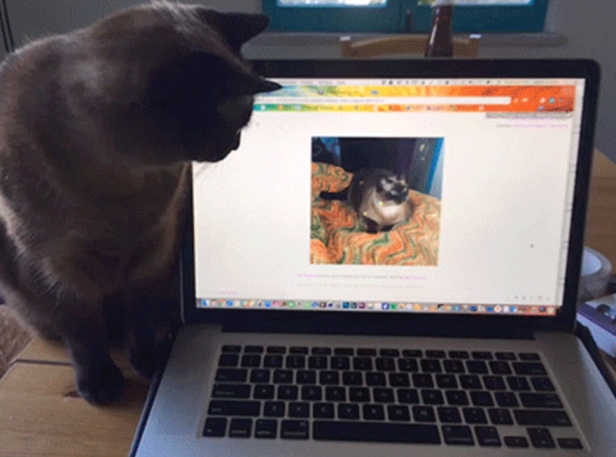
But not all adverse scenarios stop here. What if your pet just cracks the screen? Would extended warranties cover that? No, usually most don’t. But there’s a separate coverage for that too.
Yes, absolutely - as accidents are the one thing you can’t plan for, and somehow, they always find the most inconvenient timing. A spilled coffee during a deadline, a laptop dropped on a busy morning.
That’s where accidental damage protection comes in. It covers what regular and extended warranties don’t, the moments that aren’t about defects or wear, but pure bad luck.
Here’s what’s usually covered under accidental protection:
For any kind of coverage, watch the clock. Brand add-ons come with deadlines, and ASUS, for example, requires its accidental damage add-on within 180 days of purchase.
It can be, though it’s not an unreasonable investment. Here’s why-
Despite how efficient modern logistics have become, 92% of e-commerce merchants say they incur significant costs from lost, stolen, or damaged shipments.
And with porch piracy and package loss affecting around 1.7 million per day in the U.S., it’s not hard to see why. 1 in 3 Americans have experienced package theft firsthand. And Deloitte expects up to $318.9 billion in online spending this season, so the odds only go up from here.
Here’s what most shipping insurance covers:
Because when you spend hundreds of dollars on a laptop, “arriving today” should actually mean arriving safe.
Say, you send in a laptop that won't boot. A week later, the repair center emails a photo of a tiny dent on the corner and a quote that costs about as much as the laptop.
It happens more than you'd think. Manufacturer warranties only cover defects, so any sign of a drop, a dent or moisture gives the technician a reason to reclassify the claim. HP, for one, treats any trace of liquid as customer-induced damage, even condensation.
Before you ship a laptop in:
If the claim gets denied, ask for the technician's service report and photos, then request an escalation review. If that fails, the FTC suggests contacting your state attorney general or filing in small claims court.
Or skip the argument entirely. When your plan covers breakdowns and accidents, it matters much less whether the technician calls it a defect or a drop.
At the end of the day, warranties aren’t just about fixing what’s broken, they’re about creating stability.
For customers, they’re reassurance. One bad day doesn’t have to turn into an expensive one.
And the truth is, warranty providers do more than process claims. They handle the messy middle, the logistics, the replacements, the part sourcing while you keep selling.
But coverage is only half the equation. It also matters who handles the claim when something goes wrong. A brand’s extended plan doesn’t automatically mean every repair gets approved:
“Extended warranty is kinda pointless in some cases with Asus since they have problems honoring warranty and take their sweet time about it.”
With a third-party plan, the provider handles that review and, for eligible claims, coordinates the repair or replacement, so the customer doesn’t have to go back and forth with the manufacturer.
So, if you’re looking for a reliable warranty partner this holiday season, look for one that can handle post-sale protection without eating into your time, energy, or profit.
Here’s what to look for:
At SureBright, we like to keep things simple, supporting you in the background, so you focus on everything else that comes with the holiday rush.
And if you've already bought the laptop or are planning to buy one, SureBright Anywhere lets you add coverage after the purchase regardless of the store or the brand.
Over 500+ brands and 1,000s of customers trust SureBright to make warranties simple, profitable, and easy to manage.
Usually, no. Standard manufacturer warranties generally cover defects, not accidental spills or liquid damage. Apple, for example, excludes liquid damage from its one-year warranty. ASUS is an exception for eligible new notebooks, offering one year of Accidental Damage Protection that can cover liquid spills, drops, and electrical surges.
Usually because the technician determined that the problem resulted from an external event, such as a drop, crack, or liquid exposure. Ask for the inspection report and request a review if you disagree with the decision. The FTC also recommends keeping your warranty and proof-of-purchase documents.
It depends on the manufacturer and plan. The warranty period may be tied to the purchase or invoice date, so don't assume it starts when you first turn the laptop on.
It varies by provider. AppleCare+ generally has a limited enrollment window, while HP Care Packs can be purchased during the device's service life and some post-warranty plans can be added after the original warranty expires. ASUS also has specific purchase windows for its protection packages. Check the terms for your exact laptop.
It depends on what the plan adds. Compare its price with the laptop's repair or replacement cost, then check whether it covers accidental damage, mechanical breakdowns, battery issues, and other gaps in your manufacturer's warranty.
SureBright, for example, offers separate extended/breakdown and accidental-damage coverage for with the option to add protection after purchase within defined enrollment windows.
Not automatically. A manufacturer legally can't void your entire warranty simply because you used an independent repair shop or third-party part. It can, however, deny a claim for damage caused by that repair or part.
During the original manufacturer’s warranty period, defects are usually handled by the manufacturer. Extended protection then kicks in after that coverage ends.



_11zon.jpg)